 Email
Email Linkedin
 WhatsApp
 Language

News
Learn about our real-time dynamics




Replacing an iPhone 14 screen with a high-quality soft OLED display can restore the phone’s visual brilliance and touch responsiveness. However, even premium replacement modules like soft AMOLED screens may encounter issues if installation or handling is not optimal. Understanding common problems and efficient troubleshooting methods is essential for repair professionals and end-users alike.
Cause: Loose connections, improper calibration, or driver mismatches between the OLED module and the phone.
Fix:
Re-seat the flex cable securely.
Perform software calibration or firmware updates.
Inspect the metal mesh touch panel for any misalignment that may cause intermittent contact.
Cause: Incorrect TP (touch panel) connection, air gaps, or software misconfiguration.
Fix:
Ensure the metal mesh TP is properly seated.
Apply gentle pressure to eliminate minor air gaps.
Reset the device and perform a touch sensitivity test to confirm accuracy.
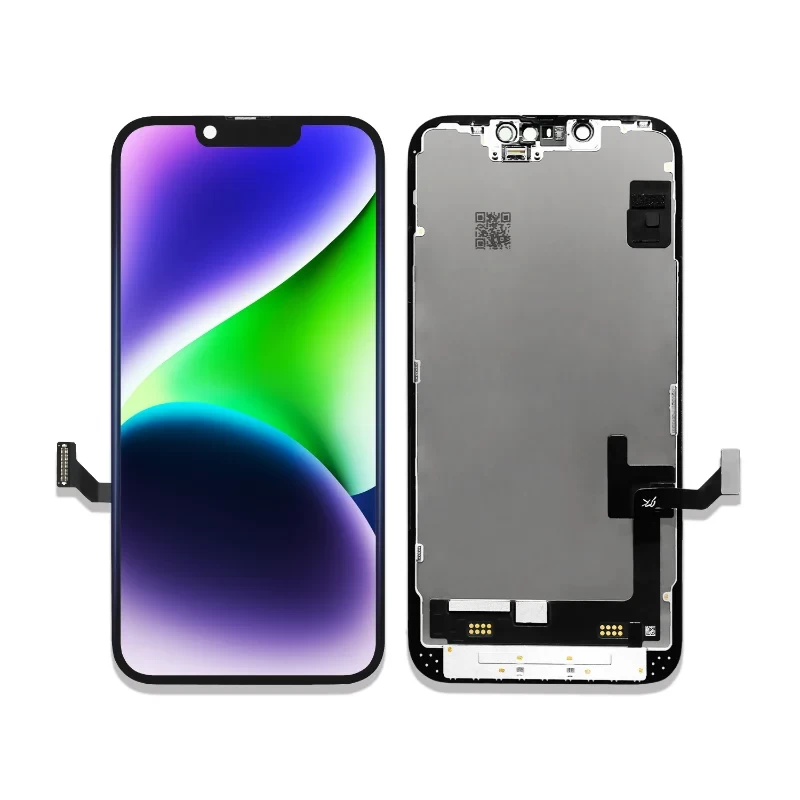
Cause: Manufacturing defects, pressure points during installation, or uneven backlight.
Fix:
Conduct a pixel test to locate defective areas.
Replace the screen if multiple dead pixels appear.
For minor inconsistencies, run pixel refresh software or gentle screen massaging techniques recommended for OLED modules.
Cause: Loose or damaged connectors, or incorrect installation of the OLED self-luminated backlight structure.
Fix:
Check the OLED connector alignment and clean any debris.
Reinstall the module with proper pressure on the flex connector.
Ensure firmware is compatible with the replacement screen.
Cause: Static electricity, moisture, or misaligned touch sensor layers.
Fix:
Power off and clean the screen surface.
Re-seat the metal mesh TP structure.
Apply anti-static precautions during installation to prevent interference.
Cause: Poor lamination, inconsistent backlight integration, or bent screen layers.
Fix:
Verify the alignment of OLED self-luminated layers.
Adjust display settings and perform brightness calibration.
Ensure the replacement module is not flexed excessively during installation.
Cause: Excessive pressure, improper bending, or low-quality adhesive during repair.
Fix:
Use professional tools to apply uniform pressure during installation.
Avoid over-flexing the soft OLED substrate.
Opt for high-quality adhesive compatible with soft AMOLED layers.
Cause: Improper calibration, damaged OLED layers, or mismatched color temperature.
Fix:
Soft OLED screens like Kelai’s maintain NTSC 108% and color temperature at 6700K.
Perform software recalibration to match factory color profiles.
Ensure uniform pressure and proper installation to prevent layer stress.
Cause: Static images displayed for extended periods or improper use patterns.
Fix:
Avoid prolonged static image display.
Use screen savers and adaptive brightness settings.
For repair shops, educate end-users about OLED-specific care.
Cause: Loose metal mesh TP connections, poor grounding, or improper installation.
Fix:
Ensure all connectors are firmly seated and secured.
Verify the display’s fast refresh rates (soft OLEDs typically support smooth responsiveness).
Perform touch and refresh tests after installation.
Handle the 6.1-inch soft AMOLED screen gently to avoid bending beyond specifications.
Maintain a clean and static-free work environment to prevent ghost touches and static damage.
Test all display functions before final assembly, including brightness, color accuracy, touch responsiveness, and refresh rate.
Use high-quality adhesive and ensure proper alignment with the phone frame for optimal performance.
Kelai Advantage: As a leading manufacturer, Kelai’s soft OLED screens for iPhone 14 offer thin bezels, metal mesh TP structure, wide viewing angles, high brightness (850±50 cd/m²), and superior color accuracy (NTSC 108%), ensuring smooth installation and minimal common issues.
Q1: Are soft OLED replacements prone to dead pixels?
A1: High-quality soft OLED modules minimize dead pixels. Issues usually arise from improper handling during installation.
Q2: How can I prevent ghost touches?
A2: Ensure TP layers are correctly seated, and use anti-static precautions during installation.
Q3: Do soft OLED screens require software calibration?
A3: Yes, calibration ensures optimal color accuracy, touch responsiveness, and refresh performance.
Q4: What makes Kelai soft OLED replacements reliable?
A4: Kelai screens are manufactured with advanced self-luminated OLED layers, metal mesh TP structure, thin bezel design, and precise factory calibration to minimize common issues.
 Related News

 Leave a Message